emby Premiere服务端破解

影视服务

搭建自建emby Premiere认证域名

两个配置二选一就行,搭建好别忘了在dns服务商那边解析好你的域名确保你能访问

1.Cloudflare Workers配置

// node_modules/itty-router/dist/itty-router.min.mjs
function e({ base: t = "", routes: n = [] } = {}) {
return { __proto__: new Proxy({}, { get: (e2, a, o) => (e3, ...r) => n.push([a.toUpperCase(), RegExp(`^${(t + e3).replace(/(\/?)\*/g, "($1.*)?").replace(/(\/$)|((?<=\/)\/)/, "").replace(/:(\w+)(\?)?(\.)?/g, "$2(?<$1>[^/]+)$2$3").replace(/\.(?=[\w(])/, "\\.").replace(/\)\.\?\(([^\[]+)\[\^/g, "?)\\.?($1(?<=\\.)[^\\.")}/*$`), r]) && o }), routes: n, async handle(e2, ...r) {
let a, o, t2 = new URL(e2.url);
e2.query = Object.fromEntries(t2.searchParams);
for (var [p, s, u] of n)
if ((p === e2.method || "ALL" === p) && (o = t2.pathname.match(s))) {
e2.params = o.groups;
for (var c of u)
if (void 0 !== (a = await c(e2.proxy || e2, ...r)))
return a;
}
} };
}

// index.js
var router = e();

router.post("/admin/service/registration/validateDevice", () => {
let validateDeviceInfo = {
cacheExpirationDays: 365,
message: "Device Valid",
resultCode: "GOOD"
};
const returnData = JSON.stringify(validateDeviceInfo, null, 2);
return new Response(returnData, {
headers: {
"Content-Type": "application/json",
"Access-Control-Allow-Origin": "*",
"Access-Control-Allow-Headers": "*",
"Access-Control-Allow-Method": "*",
"Access-Control-Allow-Credentials": "true"
}
});
});
router.post("/admin/service/registration/validate", () => {
let validateInfo = {
featId: "MBSupporter",
registered: true,
expDate: "2999-01-01",
key: ""
};
const returnData = JSON.stringify(validateInfo, null, 2);
return new Response(returnData, {
headers: {
"Content-Type": "application/json",
"Access-Control-Allow-Origin": "*",
"Access-Control-Allow-Headers": "*",
"Access-Control-Allow-Method": "*",
"Access-Control-Allow-Credentials": "true"
}
});
});
router.post("/admin/service/registration/getStatus", () => {
let getStatusnfo = {
deviceStatus: "0",
planType: "Lifetime",
subscriptions: {}
};
const returnData = JSON.stringify(getStatusnfo, null, 2);
return new Response(returnData, {
headers: {
"Content-Type": "application/json",
"Access-Control-Allow-Origin": "*",
"Access-Control-Allow-Headers": "*",
"Access-Control-Allow-Method": "*",
"Access-Control-Allow-Credentials": "true"
}
});
});
router.all("*", () => new Response("404, not found!", { status: 404 }));
var emby_unlock_default = {
fetch: router.handle
};
export {
emby_unlock_default as default
};
//# sourceMappingURL=index.js.map

2.nginx

server {
listen 443 ssl;
listen [::]:443 ssl;
http2 on; #我这里演示的是nginx1.27.3版本若你的nginx版本低于1.25可能会报错

server_name 你的认证域名;

ssl_certificate /home/ssl/cert.crt;
ssl_certificate_key /home/ssl/private.key;
ssl_protocols TLSv1.2 TLSv1.3;
ssl_prefer_server_ciphers off;

add_header Access-Control-Allow-Origin "*" always;
add_header Access-Control-Allow-Headers "*";
add_header Access-Control-Allow-Methods "GET, POST, OPTIONS";
add_header Access-Control-Allow-Credentials "true";

location = /admin/service/registration/validateDevice {
return 200 '{"cacheExpirationDays": 365,"message": "Device Valid","resultCode": "GOOD"}';
}

location = /admin/service/registration/validate {
return 200 '{"featId":"","registered":true,"expDate":"2099-01-01","key":""}';
}

location = /admin/service/registration/getStatus {
return 200 '{"deviceStatus":"0","planType":"Lifetime","subscriptions":{}}';
}

location / {
if ($request_method = OPTIONS) {
add_header Access-Control-Allow-Origin "*";
add_header Access-Control-Allow-Headers "*";
add_header Access-Control-Allow-Methods "GET, POST, OPTIONS";
add_header Access-Control-Allow-Credentials "true";
return 204;
}
}
}

server {
listen 80;
server_name 你的认证域名;
return 301 https://$host$request_uri;
}

修改 服务端dll 文件

事先准备

首先推荐你安装dnspy作为修改dll文件的编辑器

1. 安装 emby 服务端

访问 Download Emby,在”Emby Server“中选择运行的系统,在跳转的页面中选择对应的发行版和 cpu 架构进行下载,按网页上的说明进行安装。本文采用 Ubuntu 22.04 发行版进行操作,最终的安装目录为 /opt/emby-server

${Emby安装目录}/system 下找到 Emby.Server.Implementations.dllEmby.Web.dllMediaBrowser.Model.dll 三个文件,在 ${Emby安装目录}/system/dashboard-ui/embypremiere 下找到 embypremiere.js,这四个文件就是需要修改的文件。

2. 修改认证链接

embypremiere.js

  • 使用任意文本编辑器打开,替换 https://mb3admin.com/admin/service/registration/getStatushttps://<自建认证域名>/admin/service/registration/getStatus,并保存。

Emby.Server.Implementations.dll

  1. 使用 DNSpy 打开,在 “Emby.Server.Implementations.dll” - “Emby.Server.Implementations.Security” - “PluginSecurityManager” 中找到 https://mb3admin.com/admin/service/registration/validate,在该 url 对应的变量 MBValidateUrl 上右键 - 编辑字段,修改值为 https://<自建认证域名>/admin/service/registration/validate,点击确定。
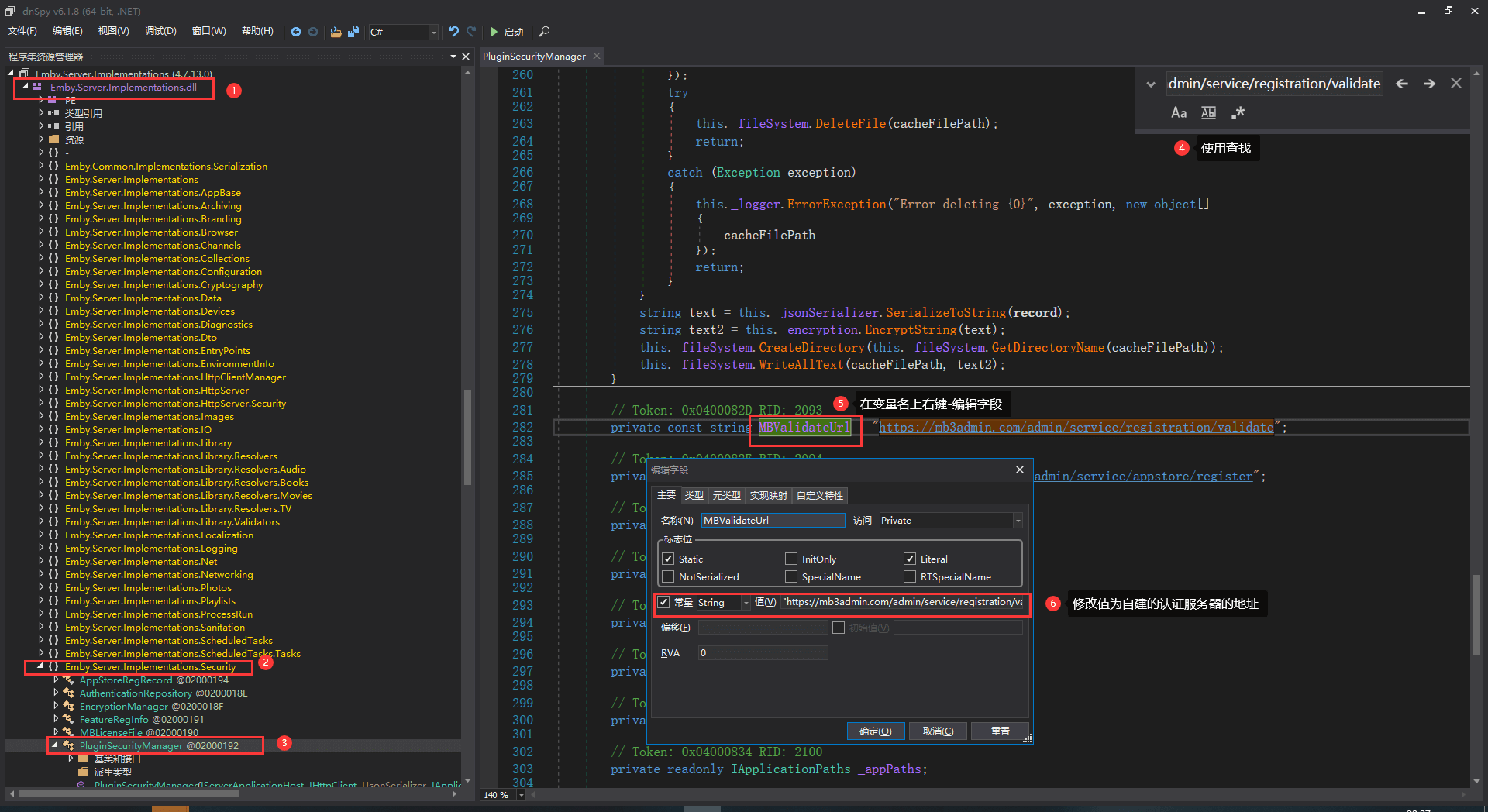
    Emby.Server.Implementations.dll-1

  2. 保持选择的类不变(即不要更改 1 中前三步选择的东西),将 DNSpy 切换到 IL 视图,再次查找 https://mb3admin.com/admin/service/registration/validate,在指令名上右键 - 编辑 IL 指令,在 102 行左右找到链接,修改值为 https://<自建认证域名>/admin/service/registration/validate,点击确定。
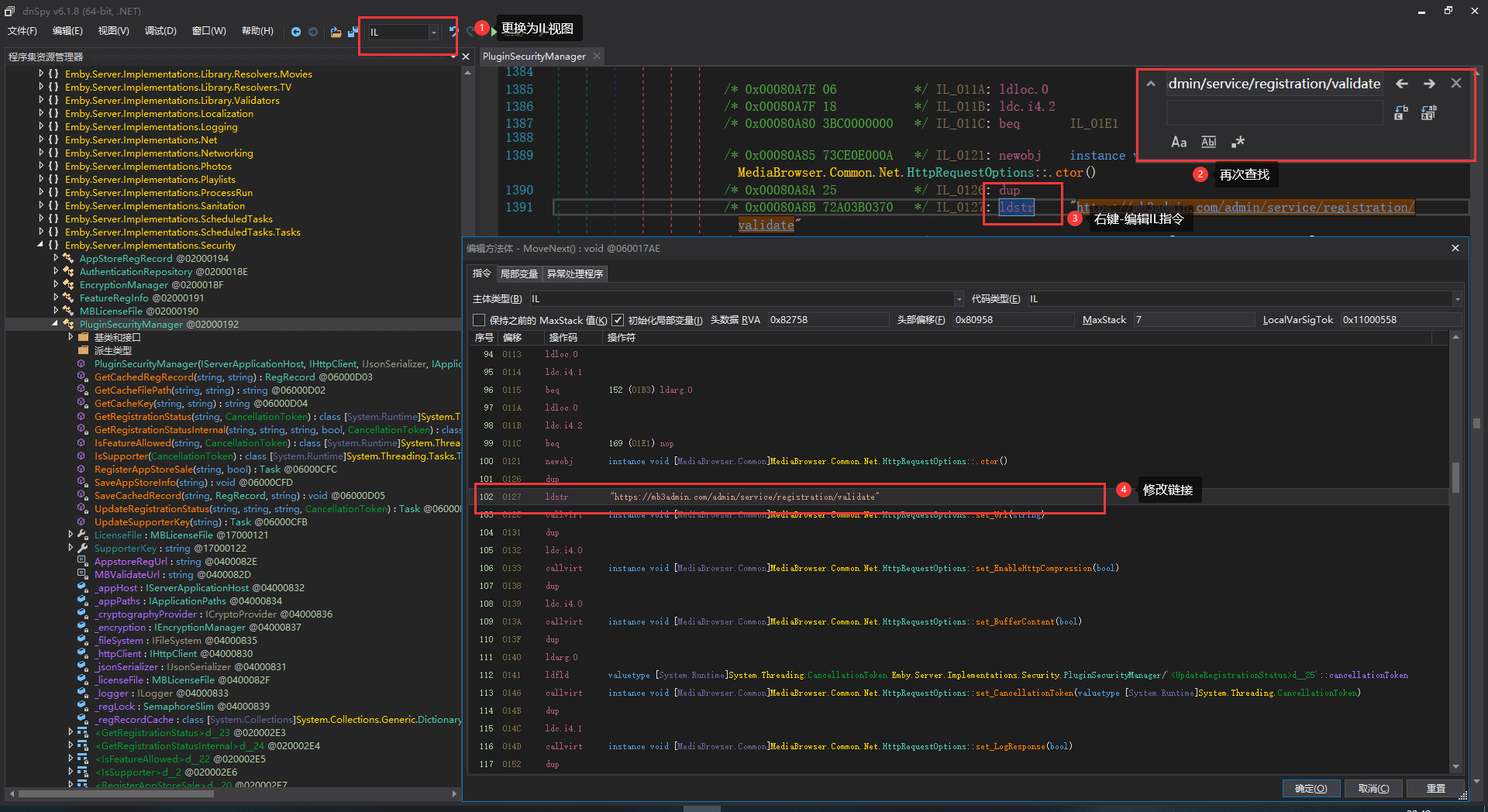
    Emby.Server.Implementations.dll-2

  3. 点击 DNSpy 左上角的文件 - 全部保存,默认是保存到原位置,也可以自定义保存位置。

Emby.Web.dll

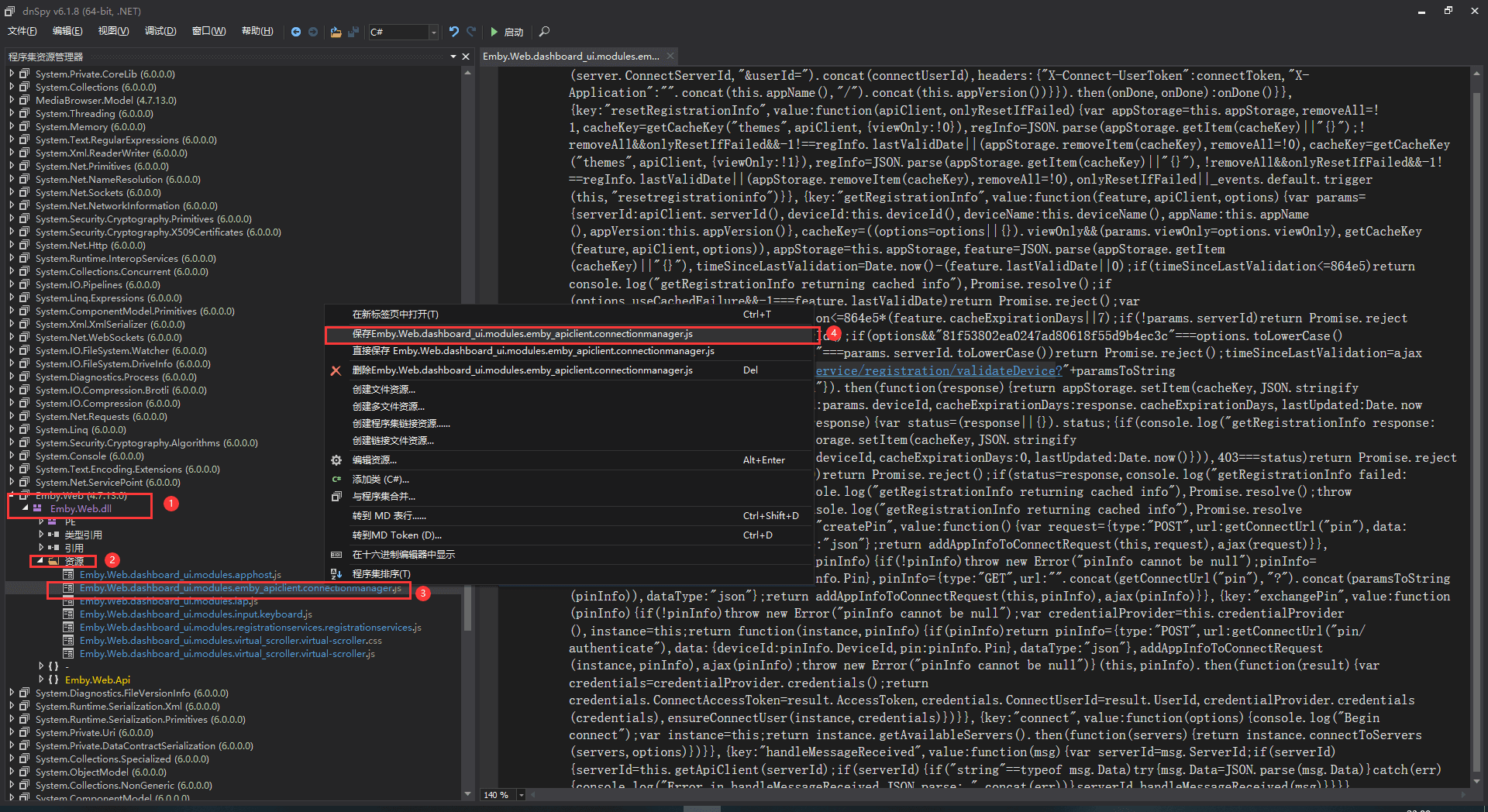
  1. 使用 DNSpy 打开,在 “Emby.Web.dll” - “资源” - “Emby.Web.dashboard_ui.modules.emby_apiclient.connectionmanager.js‎” 上右键保存,然后再右键删除。

    Emby.Web.dll-1

  2. 使用任意文本编辑器打开保存的文件,查找 https://mb3admin.com/admin/service/registration/validateDevice 并替换为 https://<自建认证域名>/admin/service/registration/validateDevice

  3. 回到 DNSpy, 在” 资源 “上右键 - 创建文件资源,将上一步中修改过的文件导入。
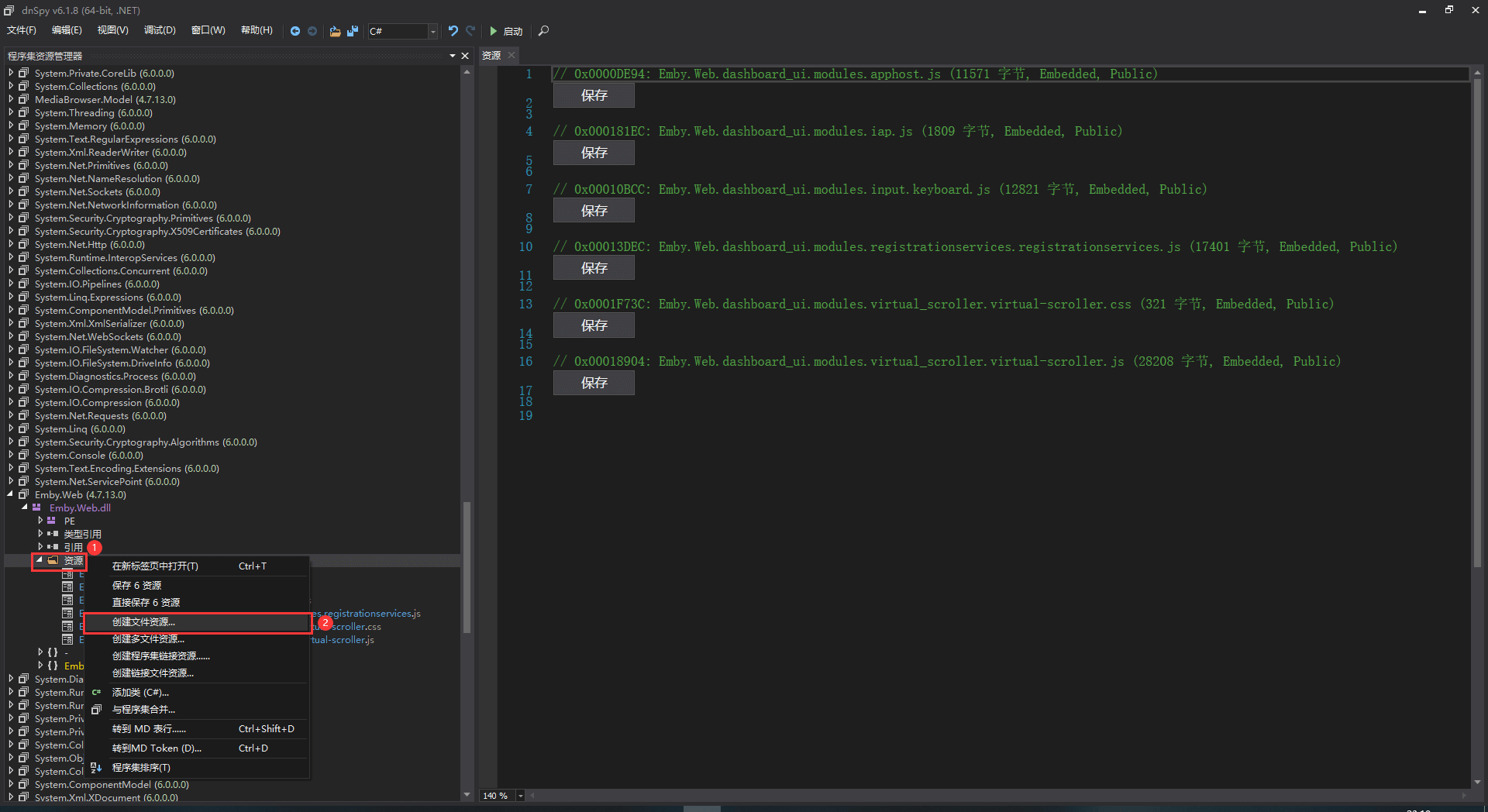
    Emby.Web.dll-2

  4. 保存

MediaBrowser.Model.dll

  1. 使用 DNSpy 打开,在 “MediaBrowser.Model.dll” - “MediaBrowser.Model.Entities” - “PluginSecurityInfo” - “IsMBSupporter” 中找到 get_IsMBSupporter() 方法。在该方法的 return 语句上右键 - 编辑方法,在弹出的窗口中修改该方法始终返回 true。
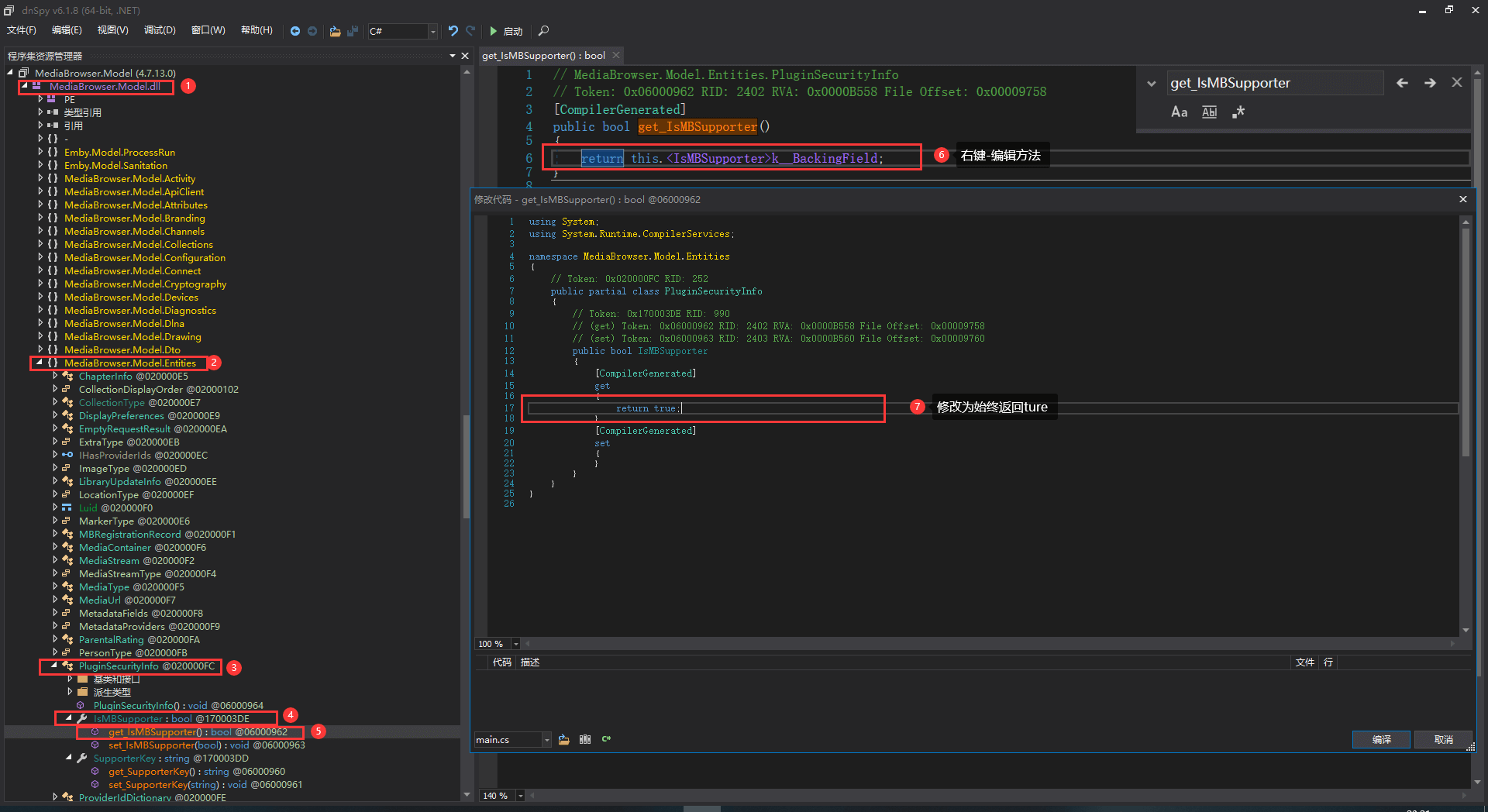
    MediaBrowser.Model.dll

  2. 保存并上传到远程ubuntu服务器

3. 确定文件位置无误后重启 Emby 服务器

sudo service emby-server restart

参考资料

破解Emby服务器端 -光子狐的博客